The first thing many people notice inside a large data center is the sound. Not the servers themselves, at least not at first. It is the constant movement of air. High-pressure cooling systems, control fans, CRAH units, liquid circulation hardware, and airflow controls create a background noise that rarely stops. After spending time in several enterprise and colocation environments over the years, I started paying closer attention to temperature behavior than the hardware itself because thermal stability often determines whether infrastructure remains predictable under sustained load.
Most public discussions around data centers focus on computing power, artificial intelligence workloads, or storage capacity. Thermal management gets less attention outside infrastructure circles, even though cooling systems directly impact reliability, operational cost, hardware lifespan, and energy usage. According to industry infrastructure reports from organizations such as the Uptime Institute and ASHRAE, cooling and power distribution remain among the largest operational factors inside modern facilities.
As compute density increases, especially in AI-oriented deployments, thermal management has become more complicated than traditional airflow planning alone.
The important distinction is that facility temperature and equipment inlet temperature are not continuously the same measurement. A room can appear acceptable at an average level while one rack, one vertical section, or one group of high-density equipment experiences a considerably different thermal condition.
For this reason, thermal behavior becomes easier to understand when power, airflow, inlet temperature, exhaust temperature, cooling capacity, and workload changes are looked at together instead of one environmental value alone.
Heat Is One of the Essential Operational Constraints
Servers convert electricity into computation, but they also generate heat continuously. In smaller office environments that heat may feel manageable. Inside hyperscale facilities operating tens of thousands of servers at the same time, heat accumulation becomes a major engineering concern.
A few years ago, I observed a hardware validation environment where rack temperatures rose noticeably within less than twenty minutes after a controlled airflow adjustment during maintenance testing. Nothing failed, but the change appeared immediately across environmental monitoring dashboards. Operators responded quickly because even localized thermal imbalance can affect hardware efficiency if it persists.
That kind of change also shows why averages can hide a developing condition. If one rack inlet rises while surrounding rows remain stable, a facility-wide average may barely move. Rack-level or inlet-level measurements can expose the difference earlier.
Modern rack densities vary widely depending on workload type. Traditional enterprise racks may operate within moderate thermal ranges, while AI-focused deployments using GPU acceleration can consume significantly more power per rack. Public infrastructure disclosures from several hyperscale operators now reference high-density environments exceeding 30 kW or even 50 kW per rack in specialized deployments.
Rack power gives a useful indication of the thermal load that needs to be removed, but density changes how difficult that task becomes. Distributing the same electrical load across several cabinets is not thermally identical toward concentrating it inside one smaller physical area.
That shift changes cooling strategy entirely.
Older facilities designed around lower-density workloads often depended heavily on raised-floor airflow distribution and perimeter cooling systems. Many newer environments increasingly depend on liquid-assisted cooling, rear-door heat exchangers, hot aisle containment, or direct-to-chip thermal systems to manage concentrated heat loads more effectively.
Existing building design can become one of the limiting portions. A facility may have sufficient floor space for additional computing equipment while power distribution or cooling capacity prevents that space from being used at the desired density.
Airflow Management Is More Exact Than It Appears
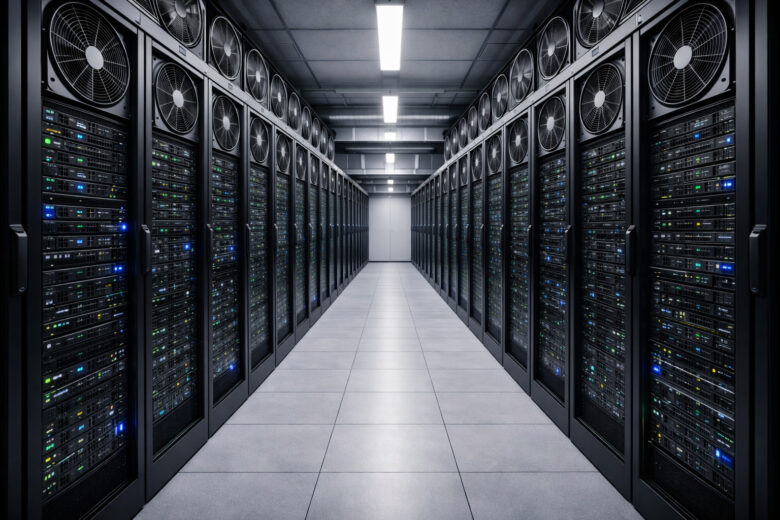
Walking through a data hall for the first time, airflow systems may look repetitive. Lines of cabinets, perforated floor tiles, controlled aisles, overhead cabling, and cooling units arranged in long symmetrical designs. Operationally, however, small environmental differences matter.
I noticed during one infrastructure walkthrough that specialists checked channel temperatures at different vertical positions inside the same rack because heat distribution was not perfectly uniform from top to bottom. Upper areas near densely packed networking equipment sometimes experienced noticeably different airflow behavior compared to lower storage-heavy sections.
Vertical measurements can expose something that one sensor placed around the middle of a rack misses. Intake conditions at the bottom, middle, and top can differ according to equipment arrangement, airflow volume, neighboring hardware, and containment behavior.
Hot aisle and cold aisle containment remains one of the more widely adopted thermal management approaches. The idea is relatively clear: separate intake airflow from exhaust heat to reduce circulation and improve cooling efficiency. In practice, maintaining proper containment requires continuous adjustment.
Recirculation and bypass airflow represent two different inefficiencies. Recirculation allows heated exhaust air to find its way back toward equipment intake. Bypass happens when supplied cold air returns toward cooling equipment without first passing through the IT load. Both can reduce the useful effect of the cooling capacity already being produced.
Blanking panels, cable openings, underfloor pressure balance, rack placement, and even partially empty cabinet sections can impact airflow behavior. According to ASHRAE thermal guidelines, poorly controlled bypass airflow can reduce cooling efficiency considerably across larger deployments.
An empty rack space can therefore still matter. Without proper blanking, air can move through the open space instead of following the expected front-to-back path through operating equipment.
The details often become visible during maintenance windows rather than normal operation. After equipment changes or infrastructure expansion, thermal patterns sometimes shift in ways operators did not initially predict. Environmental sensors usually detect those changes quickly, although the response process may include airflow recalibration, power adjustment, or workload redistribution.
This makes before-and-after measurements useful around infrastructure changes. If inlet temperatures, pressure relationships, or fan behavior move after equipment installation, the timing gives a stronger clue than noticing the same condition weeks later without a clear starting point.
Liquid Cooling Is Growing Alongside AI Infrastructure
For many years, numerous enterprise facilities depended mainly on air cooling. That model still exists widely, especially in moderate-density environments, but AI-related compute growth has accelerated interest in liquid-assisted thermal systems.
Several infrastructure analysts have pointed out that GPU-intensive workloads create heat concentrations difficult to manage efficiently through air movement alone. High-performance accelerators can generate significant localized heat under sustained training or inference operations.
Liquid can move heat through a different thermal path from conventional room airflow. In direct-to-chip arrangements, coolant approaches heat-producing components much more closely, reducing the portion of heat that first needs to be transferred into the surrounding air.
This does not necessarily mean the complete facility stops needing air cooling. Other components can continue rejecting heat toward air, making some deployments hybrid rather than entirely liquid cooled.
In one review discussion with infrastructure operators last year, engineers described how liquid-assisted systems were no longer seen as experimental inside some newer deployments. Instead, they were becoming part of long-term capacity planning for specific workload categories.
Direct-to-chip cooling, immersion cooling, and rear-door heat exchange systems are all being evaluated more seriously across parts of the industry. Adoption still changes considerably depending on facility age, workload type, capital planning, and operational philosophy.
These approaches should not be treated as one identical technology. Direct-to-chip systems move coolant toward cold plates on particular components, rear-door systems remove heat around rack exhaust, while immersion approaches place equipment into a suitable dielectric fluid environment.
There are tradeoffs, though.
Liquid cooling systems may improve thermal efficiency in dense environments, but they also introduce different maintenance considerations, plumbing requirements, monitoring strategies, and operational risks. Some organizations remain cautious about fast transitions, especially when existing air-cooled infrastructure still performs well enough for current workloads.
Leak detection, coolant condition, pumps, flow, pressure, heat exchangers, connections, and maintenance isolation introduce monitoring points that are different from a conventional air-only environment.
This also changes staff procedure. Work that was previously concentrated around electrical, server, and airflow considerations can include a fluid loop located much closer toward computing hardware.
Environmental Monitoring Never Truly Stops
Thermal management inside data centers is heavily dependent on continuous monitoring. Operators track temperature, humidity, airflow pressure, power usage, coolant flow rates, and hardware-level thermal behavior in near real time.
What surprised me during several facility visits was how much attention operators gave to trend consistency rather than isolated readings. A brief temperature increase might not trigger immediate concern. Gradual deviation patterns over days or weeks often mattered more.
Rate of change can sometimes provide information that one threshold does not. A temperature still inside an acceptable range but climbing unusually fast after a cooling component changes state can deserve attention before the final upper limit is reached.
The relationship between inlet and exhaust temperature can give another view. A change in temperature difference can correspond with workload, airflow, fan behavior, or cooling conditions and becomes more meaningful when compared beside power utilization.
Environmental dashboards usually collect massive volumes of telemetry data. Modern facilities may contain thousands of sensors distributed across power zones, rack rows, cooling infrastructure, and control systems. Machine learning-assisted monitoring tools are also becoming more common in large-scale environments where operators attempt to predict thermal irregularities before limits are exceeded.
Sensor quality itself needs observation. A failed or drifting sensor can produce an alarming value without a real environmental event, while a sensor that stops updating can make a changing condition appear stable.
Comparing nearby sensors, hardware telemetry, cooling state, and recent trend behavior helps separate one questionable measurement from a broader thermal event.
According to public reporting from major cloud operators, predictive maintenance and environmental optimization have become increasingly important as energy costs and compute density continue rising.
Even outside climate conditions can influence operations. Facilities in warmer climates often require different cooling strategies than those operating in cooler regions. Water availability, humidity variation, regional utility pricing, and environmental regulations all shape infrastructure design decisions.
Seasonal conditions can consequently change which cooling mode is most efficient even while computing equipment inside the building remains largely the same.
Power Usage Effectiveness Still Matters
Power Usage Effectiveness (PUE) remains one of the most referenced efficiency measurements in the data center industry. The measurement compares total facility energy usage against the energy used directly by computing hardware.
In simplified form:
PUE = Total Facility Energy / IT Equipment Energy
A theoretical value approaching 1.0 indicates that a larger share of facility energy reaches computing equipment instead of being consumed by supporting infrastructure. Real facilities require cooling, power conversion, lighting, controls, and other supporting systems, so context around the value remains necessary.
Lower PUE values generally show more efficient infrastructure operation, although interpretation requires context. Climate conditions, workload density, redundancy requirements, and facility age all influence achievable efficiency ranges.
PUE also does not directly measure application efficiency. Two facilities can show similar PUE while the useful computing work performed by their IT equipment differs. It is mainly an infrastructure energy-efficiency relationship rather than a complete measurement of computing productivity.
Several hyperscale operators publicly report yearly PUE averages close to or below 1.2 in some facilities. Smaller enterprise environments often operate higher depending on infrastructure design and cooling architecture.
Comparisons should therefore use similar measurement boundaries and periods where possible. A yearly facility figure, a short seasonal reading, and a design target do not describe exactly the same operating condition.
I have seen situations where thermal optimization projects delivered measurable efficiency improvements without major hardware replacement. In one enterprise deployment review, relatively modest control adjustments and airflow balancing changes reduced localized cooling strain enough to improve environmental consistency across multiple rows.
Those improvements were not dramatic from the outside. Internally, however, operators considered them important because small efficiency gains become financially significant at scale.
At large continuous electrical loads, a relatively small percentage change can accumulate across thousands of operating hours. This is one reason airflow correction and control tuning can remain relevant even where the existing cooling equipment is technically sufficient.
Thermal Stability Impacts Hardware Reliability
Temperature variation affects more than energy usage. Sustained thermal imbalance may also influence hardware reliability over time.
Storage systems, networking hardware, power distribution equipment, and compute nodes all operate within specified environmental ranges. Modern hardware includes extensive thermal protection mechanisms, but persistent heat exposure can still contribute to component degradation or unexpected failure patterns.
Modern processors can respond toward high temperature by changing their own performance or power behavior before a complete shutdown becomes necessary. This protects hardware but means a thermal condition can influence computing performance before it creates an obvious equipment failure.
Fans can react as well. Higher internal temperatures can increase fan speeds, which raises their own power use and can change the thermal and energy relationship around the rack.
Network operators often monitor thermal limits conservatively in mission-critical environments because infrastructure outages rarely come from a single dramatic event alone. More often, issues develop gradually through overlapping stress conditions, delayed maintenance, airflow inefficiencies, or localized environmental instability.
A cooling component can degrade without immediately causing an outage because remaining capacity compensates. The condition becomes more serious when another cooling component is unavailable, outside temperature rises, or computing load increases at the same time.
This is where redundancy and capacity margin become connected. Having another cooling unit available matters only if the remaining system can carry the required thermal load under the actual operating condition.
A balanced perspective matters here because not every facility faces identical risk levels. Some newer hyperscale campuses operate with advanced thermal modeling and extensive redundancy. Smaller regional facilities may depend on older cooling designs that still work effectively but require more operational oversight during seasonal demand peaks.
There is also growing discussion around sustainability pressure. Cooling systems consume significant resources, especially in high-density environments. Public infrastructure data shows increasing industry focus on water-efficient cooling models, renewable energy integration, and adaptive environmental control systems.
Energy and water performance can sometimes involve tradeoffs rather than one universal cooling answer. Local climate, electricity supply, water availability, workload density, and facility design influence which approach makes practical sense for a particular location.
The Operational Reality Behind Stable Infrastructure
Most users never think about thermal management when opening a cloud application or streaming media content. From the outside, digital services feel separated from physical limitations. Inside infrastructure environments, heat remains one of the most constant operational factors shaping system behavior.
After spending time observing both enterprise and carrier-scale environments, I noticed that experienced operators often discuss airflow and thermal behavior with the same level of attention that software teams give to application performance. Stability depends on both.
The relationship becomes especially visible when infrastructure is examined as a chain. Workload produces electrical demand, electrical demand becomes heat, heat needs transport away from equipment, and the cooling system itself requires power and supporting infrastructure.
A problem in one part can therefore appear somewhere else. Increased compute load can raise thermal demand, higher thermal demand can increase cooling activity, and insufficient airflow around one rack can create a local condition even while facility cooling capacity remains available overall.
The growth of AI workloads, regional cloud expansion, and high-density compute environments will likely keep thermal engineering near the center of infrastructure planning for years ahead. Cooling systems are no longer treated as background utilities in many facilities. They are becoming active components inside broader operational strategy.
Technical Review and Sources
This overview considers thermal management through rack density, airflow separation, environmental sensing, liquid-assisted cooling, facility energy efficiency, equipment behavior, redundancy, and operational monitoring. These areas need to be looked at together because one temperature measurement alone does not continuously explain why a thermal condition developed.
The first-hand observations already included in this article give direct context from enterprise, colocation, hardware validation, and infrastructure review environments. They are kept only where the original experience is stated and are not expanded into additional personal claims.
Technical ranges also require context. Recommended environmental conditions, rack power densities, cooling architecture, and efficiency values differ according to equipment, facility design, measurement method, and operating conditions. Current manufacturer or facility specifications remain more useful for an individual deployment than one general number.
Last technical review: September 2026
References
ASHRAE. Thermal Guidelines for Data Processing Environments and data center thermal guidance.
Uptime Institute. Data center infrastructure, cooling, resiliency, and operational research.
The Green Grid. Power Usage Effectiveness and data center efficiency resources.
National Institute of Standards and Technology. Data center and information technology infrastructure research.
Manufacturer technical documentation should be consulted for equipment-specific inlet temperature, humidity, power, and cooling requirements.